
Xparibet Registration — Create Your Account and Log In
Create your Xparibet account and get started with sports betting, casino and crash games. Register now and use one account across your browser and mobile app.
On this page
Registration at a Glance
| Parameter | Value |
|---|---|
| Time to complete | ~2 minutes |
| Required | Email or phone number, password, account currency |
| Minimum age | 18+ |
| Accounts per person | One |
| Verification (KYC) | Before the first withdrawal |
| Cost | Free |
How to Register on xparibet Step by Step
Step 1. Open an official entry point
Use the register button on this site, the operator's own domain, a verified mirror link or the mobile app. Phishing clones often imitate the registration page — apply the usual checks: HTTPS, no re-registration demands elsewhere, address matches an official channel.
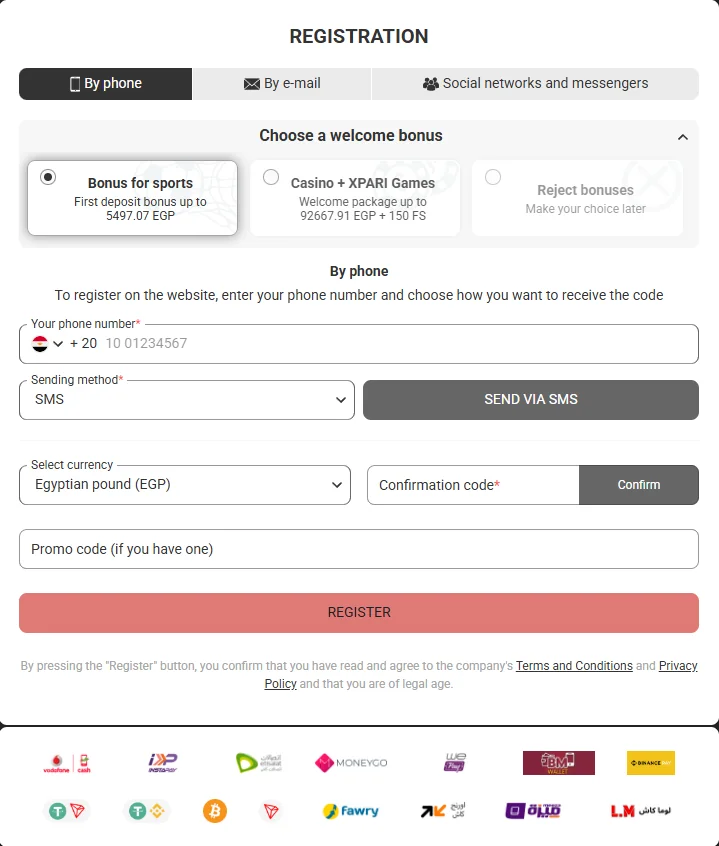
Step 2. Fill in the registration form
Choose the contact method (email or phone), set a strong password and — the most important field — select your account currency. The currency cannot be changed after confirmation, so pick the one matching your main payment method. The optional promo code field activates a welcome offer; current codes are announced in the Promotions section and the official Telegram channel.
Step 3. Confirm your contact
Enter the SMS code or follow the email link. The code expires within a few minutes; request a new one only after it does — repeated requests in a loop can temporarily pause the form.
Step 4. Complete your profile
Fill in full name, date of birth and address exactly as in the documents you will use for verification and in your payment method's profile. A mismatch here is the number one reason for delayed payouts later.
Registration Formats: Email, Phone or App
- By email — classic route; the confirmation link arrives instantly and doubles as your first login link.
- By phone — fastest route; the SMS code confirms the number that will also receive security alerts.
In the app — the Android APK and iOS client open the same form inside the application; xparibet app registration produces an identical account with biometric login enabled by default.
All three formats create the same account type with the same limits and bonuses — choose by convenience, not by expected advantage.
xparibet Login: Browser, App and Lite Version
Signing in works with the same credentials on every channel:
- Browser: the xparibet com login form on the main domain or any verified mirror; on phones the mobile site (m xparibet login) opens the same form automatically.
- App: the xparibet app login screen in the Android and iOS clients, with optional fingerprint or Face ID unlock.
- Lite / PWA: the xparibet lite login for the lightweight web version on older devices.
- Login link: if the domain you bookmarked no longer opens, your credentials still work — open the current address from the mirror page and sign in as usual.
Password recovery
The "forgot password" form sends a reset code to your registered contact. Recovery always goes to the original email or phone — this is why keeping your contact actual in the profile settings matters before you need it, not after.
Google Authenticator and two-factor authentication
In profile security settings you can bind Google Authenticator to xparibet: each login then requires a rotating six-digit code from your device. During setup the platform shows a backup key — write it down offline. If the authenticator device is lost, recovery goes through support with full identity confirmation; without the backup key this takes longer, so store the key properly.
Login ID and password safety
Use a unique password not repeated on other services, keep it in a password manager, and remember the golden rule: support never asks for your password or SMS codes — any such request is phishing, report it and change the password immediately.
xparibet Demo Account: Practice Without Risk
The xparibet demo account is a training environment: a virtual balance for learning slot mechanics, table rules and crash-game pacing before real-money play. Opening a demo requires the same registration as a real account — the platform keeps one profile with switchable modes where the provider permits demo play.
Demo limitations are honest and simple: virtual winnings are not payable, bonuses do not apply to demo rounds, and some live tables run real-money only. Treat the demo as a tuition-free classroom, not as a strategy testing ground — demo results do not predict real rounds.
Account Verification (KYC): Why and How
Verification is a licensing requirement, not a platform whim: it proves the account belongs to a real adult person and protects your funds from takeover. The standard set includes an ID document, a proof of address and, for some payment methods, confirmation of the payment instrument ownership.
Submit clear, full-frame photos with readable details. Typical review time is 24–72 hours. Passing KYC once removes the check from every future withdrawal — the earlier you complete it, the smoother your first payout goes.
One Account per Person: Why the Rule Is Strict
The platform's terms allow exactly one account per person, device and household profile. Multi-accounting is classified as bonus abuse: detected duplicates lead to confiscated winnings and closed accounts, and the blacklist follows the person, not the email.
Practical consequences worth knowing before experimenting:
- Forgot you already registered? Use password recovery or contact support — do not create a second account.
- Shared family device? Log out after sessions and use separate profiles where possible.
- Changed phone or email? Update contacts in settings instead of re-registering.
Registration & Login Problems: Fixes
Confirmation code does not arrive
Wait out the code's lifetime, request once more, and check spam folders for email routes. If the SMS still does not come, switch the registration format to email — the account type stays identical.
"Account already exists" during sign-up
You or someone with access to your contact registered earlier. Recover the password via the original contact, or ask support to check the profile — never force a duplicate.
Login loops after wrong password attempts
The form pauses briefly after repeated failures as a brute-force protection. Wait a few minutes, then use password recovery instead of retrying.
App login fails after an update
Clear the app cache or reinstall the current build from the Android or iOS page; credentials and balance are server-side and unaffected.
Wrong currency chosen at registration
Currency is fixed at confirmation. Contact support immediately after the mistake — early corrections are sometimes possible; after the first deposit they are not. This is why Step 2 asks you to slow down exactly there.
First Steps After Sign-Up
- Deposit with a method matching your profile name — see the payments guide;
- Claim a welcome offer only after reading its wagering terms in the Promotions section;
- Set personal limits — deposit and session reminders configured now work silently forever;
- Explore the casino lobby or the sportsbook at your own pace.
Registration: App vs Browser
| Parameter | In the app | In the browser |
|---|---|---|
| Form | Identical | Identical |
| Biometric login afterwards | Yes | No |
| Push on bonus drops | Yes | No |
| Best scenario | Daily players | One-off or desktop sign-up |